If you are concerned with privacy online then most wearable health devices have been somewhat out of reach. Regardless of the privacy policy of each brand, I don’t particularly like the idea of sensitive health information being stored somewhere out of reach.
The Search
I had a desire to start tracking more of my health information. Mainly sleep, heart rate, step count and richer run data. After doing some light searching, I came across this video by YouTuber Becca Farsace recommending the Garmin Forerunner 165. While most of the information in the video wasn’t applicable, mostly the Garmin app, notifications, and well anything that has to do with connecting the device to the phone. Three things stood out to me:
- Physical buttons
- Battery life
- Built in GPS
One of my biggest gripes with the Apple watch when I was using it in the past was it seemed like the intended usage was to charge it while you were sleeping. Sleep data is probably the information I’m most interested in, and having to take my watch off nearly every day to let it charge so I could use it while sleeping quickly became a pain point for me in the past. Anyways, as my partner would put it, I “bought myself a project” and ordered the watch.
Initial Setup
I’m very pleased to say, the initial setup for the watch was extremely easy. Upon unboxing it and powering it on the watch started walking me through some basic setup. Biometric information, height weight, etc. That is when I reached the dreaded “Pair with phone” screen…which I was able to skip easily. Over the next few days the watch asked me two or three more times if I want to pair my phone. But since then it hasn’t bugged me at all, and I’ve not a single time had to interact with the Garmin Connect app. As a note, as of writing I haven’t attempted to upgrade the firmware on the watch, though it seems as if I were to ever need to I would need to either connect to Garmin Connect or use their windows app.
The Data
With my specific model of watch I’m able to view some, but not all historical information that is stored on device. I can view a seven day rolling average for my resting heart rate (RHR), step counts, and sleep. As well as all the activities I’ve registered (runs, walks, hikes, etc). That being said, the device does have 3.5gbs of onboard storage. Of which I’ve used roughly 25% of in the five-ish weeks I’ve been using it. Their documentation would suggest that if I don’t do anything about that data it would start deleting the oldest entries.
I’m not very keen on losing historical health data, so I needed to come up with a solution. My first thought was just plug the device into my computer, drag the files off, and upload them up to my NAS. Which technically would have worked fine, but I kind of wanted more. I had access to all of this rich health-information, I could build some kind of dashboard to monitor and display historical views. With that in mind I got to thinking what would be the method with the least friction to achieve my goals of a personal health dashboard.
The Project
Before we talk about the project we need to talk about the FIT protocol. FIT or Flexible and Interoperable Data Transfer is Garmin’s file format for storing all things health and fitness on your device. FIT files are fairly complex, and will need some special tools for parsing. Lucky for us Garmin has given us multiple options to parse these files. The method I ended up going with was their javascript sdk, which is a very easy to use library with ZERO dependencies. A basic example of running it looks like this
import { Decoder, Stream } from "@garmin/fitsdk"

const glob = new Bun.Glob("**/*.{fit,FIT}") // some .fit files are all caps. I don't know why

for await (const relative of glob.scan({cwd: "/.someDir"})) {
    const path = `./someDir/${relative}`;
    const bytes = await Bun.file(path).bytes();

    const decoder = new Decoder(Stream.fromBuffer(bytes));
    const { messages } = decoder.read();

    console.log(messages.fileIdMesgs?.[0]?.type)
}
The shape of a .fit file can vary quite a bit depending on the type of activity stored in the file. But generally they all look something like this:
// Parsed sleep file
{
     "fileIdMesgs": [
       { "serialNumber": 3527657061, "timeCreated": "2026-05-27T06:06:32.000Z",
         "manufacturer": "garmin", "product": 4432, "type": 49, "garminProduct": "fr165" }
     ],
     "fileCreatorMesgs": [
       { "softwareVersion": 2609 }
     ],
     "deviceInfoMesgs": [
       { "timestamp": "2026-05-27T06:06:32.000Z", "serialNumber": 3527657061,
         "manufacturer": "garmin", "product": 4432, "softwareVersion": 26.09,
         "garminProduct": "fr165" }
     ],
     "eventMesgs": [
       { "timestamp": "2026-05-26T22:41:58.000Z", "data": 1148769718, "event": 74, "eventType": "start" },
       { "timestamp": "2026-05-27T06:06:30.000Z", "data": 1148796390, "event": 74, "eventType": "stop" }
     ],
     "sleepAssessmentMesgs": [
       { "averageStressDuringSleep": 5.6, "combinedAwakeScore": 87, "awakeTimeScore": 88,
         "awakeningsCountScore": 87, "deepSleepScore": 62, "sleepDurationScore": 83,
         "lightSleepScore": 39, "overallSleepScore": 76, "sleepQualityScore": 81,
         "sleepRecoveryScore": 100, "remSleepScore": 52, "sleepRestlessnessScore": 85,
         "awakeningsCount": 1, "interruptionsScore": 87 }
     ],
     "sleepLevelMesgs": [
       { "timestamp": "2026-05-26T23:54:58.000Z", "sleepLevel": "light" },
       { "timestamp": "2026-05-27T00:24:58.000Z", "sleepLevel": "deep" }
       // ...
     ]
   }
The solution I ended up with isn’t anything to write home about, but it was fun to think about. Running on my NAS I setup a libsql container, and another container running an ingest server. The ingest server waits and listens for new files to be dropped into a specific directory. When it does it parses each file, one by one, and does two things. Firstly it takes the parsed data info and writes it to the sqlite db. Secondly it moves the ingested file into a new directory, preserving it. To ensure I don’t upload duplicates, since I’m uploading all the .fit files from the watch each time I charge it, I created the FitContentHash. Which is a SHA-256 hex digest of the file’s raw bytes. I went with this approach because I wanted the data to be content-addressed, tied to the content of the file not the name or location. Renaming or re-uploading a file shouldn’t insert a new record into the db. Re-ingesting the same bytes results in a no-op, and deletes the file.

The other half of the project was the actual dashboard. This is a fairly stock standard CRUD app, and the main reason I went with libsql earlier, since libsql exposes http endpoints, and my NAS is bound to my LAN, I can query the DB directly from the client easily to build the views. I spun up a SvelteKit app, vibe coded a few graphs and dashboards and voila.
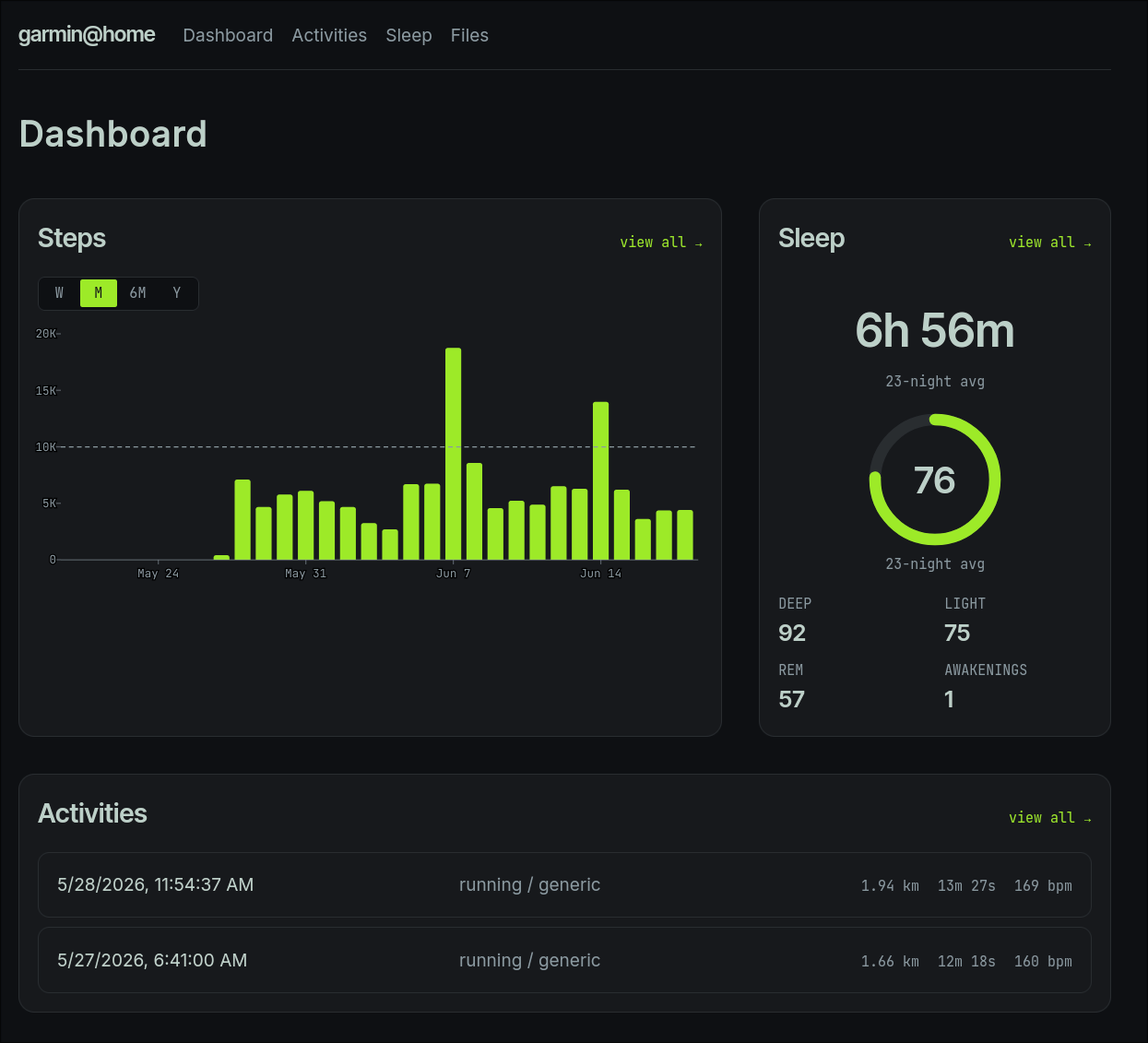
By design it’s pretty basic at the moment, showing my average steps per day at various timescales, a log of all my activities/workouts, and a configurable sleep average. I’m interested in seeing how this evolves in the future, what data I can tie together myself, what other metrics I want to start pulling in and tracking.
Conclusion
I was very happily surprised by this endeavour, and impressed by Garmin. I can’t speak for all their devices, but the Forerunner 165 works great offline. Their SDK makes parsing data a breeze, plus the fact it’s open source and has zero dependencies was pleasant. Perhaps it’s my pessimism, but it’s not hard to imagine that a similar project with other health wearables would have been impossible. This isn’t the most ergonomic solution, but it works for me and keeps my health data in my hands.